Entity-Table Mapping:
Context & Entity Classes:
Every Entity Data Model generates one context class and entity class for each DB table included in the EDM. Expand School.edmx and see two important files, {EDM Name}.Context.tt and {EDM Name}.tt:
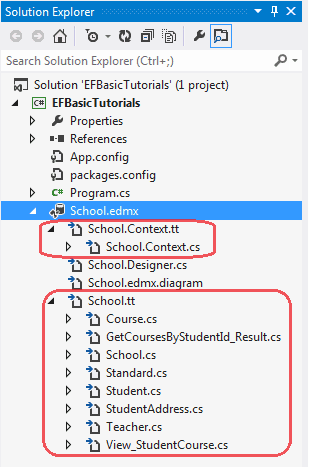
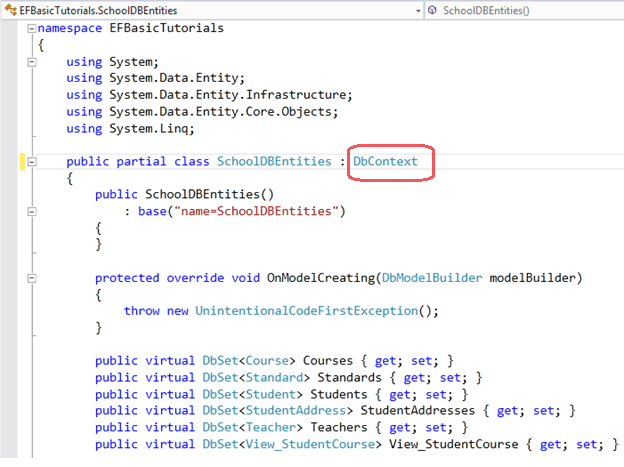
School.Context.tt: This T4 template file generates a context class whenever you change Entity Data Model (.edmx file). You can see the context class file by expanding School.Context.tt. The context class resides in {EDM Name}.context.cs file. The default context class name is {DB Name} + Entities. For example, the context class name for SchoolDB is SchoolDBEntities, then the context class is derived from DBContext class in Entity Framework. (Prior to EF 5.0 it had been derived from ObjectContext.)
Model Browser gives you all the information about all the objects and functions EDM has created. Open Model Browser by right clicking on the EDM Designer and select Model Browser from the context menu.
Model browser contains all the information about the EDM, its conceptual model, storage model and mapping information as shown below.
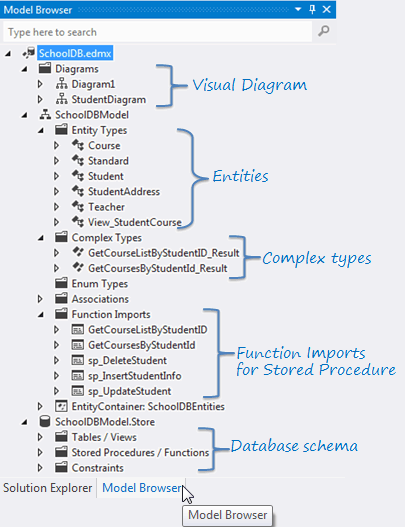
As you can see in the above figure, model browser contains the following objects:
Diagrams: Model browser contains visual diagrams of EDM. We have seen a default visual diagram created by EDM. You can also create multiple diagrams for one EDM if your application has a large number of entities.
Entity Types: Entity types lists all the class types which are mapped to the database tables.
Complex Types: Complex types are the classes which are generated by EDM to contain the result of stored procedures, table-valued function etc. These complex types are customized classes for different purposes.
Enum Types: Enum types lists all the entities which are used as Enum in entity framework.
Associations: Associations lists all foreign key relationship between the entity types.
Function Imports: Function imports lists all the functions which will be mapped to stored procedures, table-valued functions, etc. Stored procedures and table-valued functions will be used as functions and not an entity in EF.
.Store: Store represents database schema (SSDL).
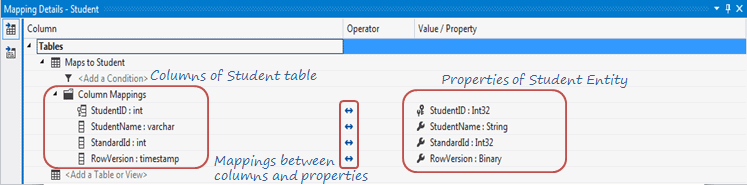
Each entity in EDM is mapped with the database table. You can check the entity-table mapping by right clicking on any entity in the EDM designer -> select Table Mapping. Also, if you change any property name of the entity from designer then the table mapping would reflect that change automatically.
Context & Entity Classes:
Every Entity Data Model generates one context class and entity class for each DB table included in the EDM. Expand School.edmx and see two important files, {EDM Name}.Context.tt and {EDM Name}.tt:
School.Context.tt: This T4 template file generates a context class whenever you change Entity Data Model (.edmx file). You can see the context class file by expanding School.Context.tt. The context class resides in {EDM Name}.context.cs file. The default context class name is {DB Name} + Entities. For example, the context class name for SchoolDB is SchoolDBEntities, then the context class is derived from DBContext class in Entity Framework. (Prior to EF 5.0 it had been derived from ObjectContext.)
Model Browser:
We have created our first Entity Data Model for School database in the previous section. The visual designer of EDM does not display all the objects it creats. It only display entities which are mapped to the database tables and views.Model Browser gives you all the information about all the objects and functions EDM has created. Open Model Browser by right clicking on the EDM Designer and select Model Browser from the context menu.
Model browser contains all the information about the EDM, its conceptual model, storage model and mapping information as shown below.
As you can see in the above figure, model browser contains the following objects:
Diagrams: Model browser contains visual diagrams of EDM. We have seen a default visual diagram created by EDM. You can also create multiple diagrams for one EDM if your application has a large number of entities.
Entity Types: Entity types lists all the class types which are mapped to the database tables.
Complex Types: Complex types are the classes which are generated by EDM to contain the result of stored procedures, table-valued function etc. These complex types are customized classes for different purposes.
Enum Types: Enum types lists all the entities which are used as Enum in entity framework.
Associations: Associations lists all foreign key relationship between the entity types.
Function Imports: Function imports lists all the functions which will be mapped to stored procedures, table-valued functions, etc. Stored procedures and table-valued functions will be used as functions and not an entity in EF.
.Store: Store represents database schema (SSDL).

No comments:
Post a Comment